
Many people think redeeming an Amazon gift card always goes smoothly, yet confusion persists because expectations do not align with how the system actually behaves. This guide explains the entire redemption flow slowly and clearly, with each step written as a person would explain it calmly, so no part feels rushed or unclear.
Things You Must Check Before You Redeem a Gift Card
Before you enter a gift card code, a few basic checks can prevent permanent mistakes. These checks matter because once a gift card balance enters an account, that balance stays there permanently.
You should first confirm that the correct Amazon account is open. The email address visible at the top of the account page becomes the permanent holder of the gift card balance. Amazon does not offer any method to move that balance later.
You should also confirm the marketplace region. A gift card issued for the United States marketplace works only on the United States Amazon site. When the marketplace does not match, Amazon rejects the code even if the code itself is genuine.
The Most Important Check: Is it a Gift Card or a Voucher?
Before you even open the app, look at the code you have. Amazon separates these into two completely different wallets, and using the wrong button is the number 1 reason for errors.
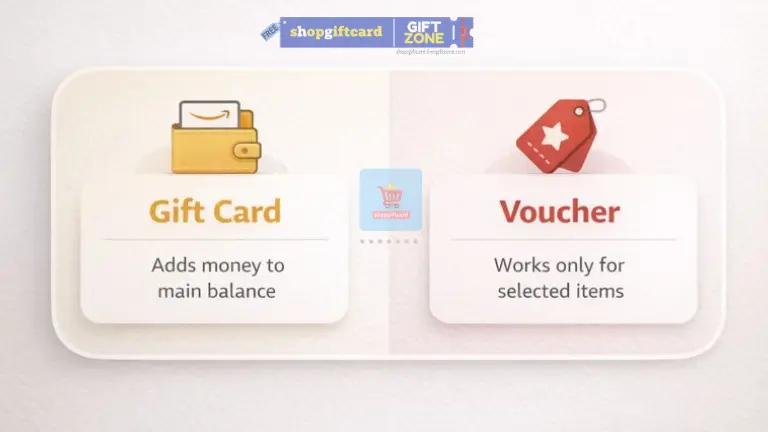
- Amazon Pay Gift Cards (Yellow Icon): These add money to your main balance. You can use this balance for almost anything on Amazon.
- Amazon Vouchers (Red Icon): These are specific credits (like “Shopping Vouchers” or “Fresh Vouchers”). They sit in a separate list and often apply only to specific categories.
Step-by-Step: How to Redeem Correctly
Many people attempt to redeem codes during checkout, but that approach often creates confusion. The safest method is to load the balance into your account before you shop.
Step 1: Navigate to the Right Section
- On Mobile: Open the Amazon App menu and tap on “Amazon Pay” or find the “Gifting” section.
- On Desktop: Click on “Gift Cards” in the top navigation bar.
Step 2: Choose the Correct Button
Once you are on the Gift Card/Amazon Pay page, look at the icons at the top:
- Tap “Add a Gift Card” (Yellow Icon) if you want to add cash to your main balance.
- Tap “Add a Voucher” (Red Icon) if you have a promotional code or a specific shopping voucher.
Step 3: Enter the Code
- For Gift Cards: Enter the code in the box and click the yellow button labeled “Add gift card to balance”.
- For Vouchers: Enter the code in the “Enter Voucher Code” box and click “Add Voucher”.
When the screen refreshes, your balance is updated instantly.
Where Did My Money Go? (Understanding Your Balance)
If you redeemed a code but your main “Amazon Pay Balance” didn’t increase, don’t panic. You likely redeemed a Voucher.
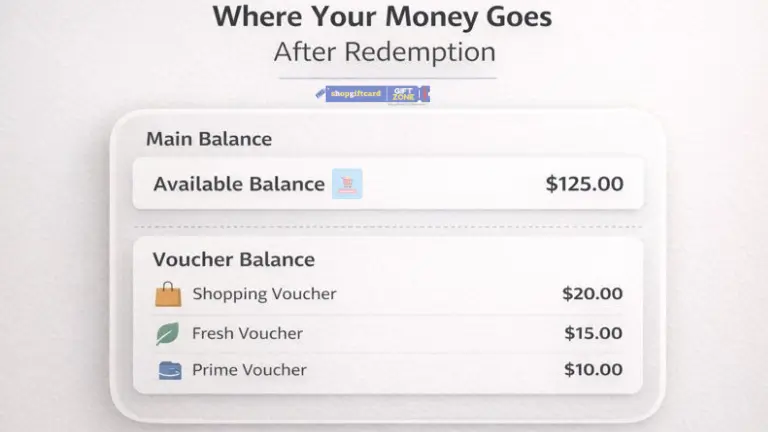
- Main Balance: Shows at the top as “Available balance”.
- Voucher Balance: Scroll down to the “Vouchers” section. Here you will see separate balances for “Shopping Voucher,” “Fresh Voucher,” or “Prime Voucher”.
Why the Cart Does Not Show Any Price Change
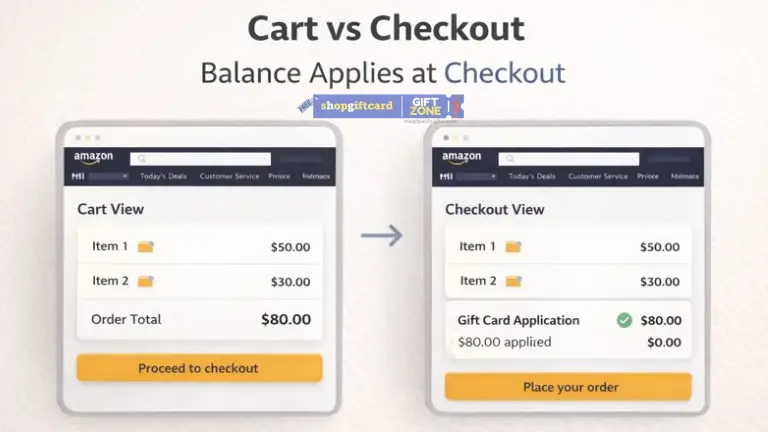
Many users assume redemption failed because the cart still shows full prices. This confusion happens because the cart does not interact with payment systems.
The cart works like a temporary planning area where Amazon only shows selected items and their prices without touching any balance.
Gift card balance comes into use only after the checkout process starts, and until that point, all prices stay unchanged. Once you reach the checkout page, the system automatically applies the available gift card balance to the order.
Common Mistakes People Make During Redemption
Most redemption problems come from small oversights rather than system failure. These mistakes appear frequently.
- Redeeming a code while signed into the wrong account
- Using a gift card on the wrong country site
- Expecting immediate price changes inside the cart
- Refreshing pages repeatedly during balance update
- Sharing unused gift card codes with others
Wrong Account: The email address visible at the top of the account page becomes the permanent owner of that money. Amazon cannot transfer funds after redemption.
Wrong Region: A gift card issued for the US store (.com) will not work on the India store (.in).
Expecting Cart Updates: The cart is a planning area; it does not show your balance. Your gift card money is only applied after you press “Proceed to Checkout.”
These mistakes create stress but usually do not cause loss.
Meaning of Common Error Messages
Error messages often look alarming at first glance and create unnecessary worry, but in most cases, they come from routine system checks and have easy explanations that do not indicate any real problem with your account or balance. The understanding of these messages prevents unnecessary panic.
| Message | What It Means |
|---|---|
| Code already redeemed | The code was used earlier |
| Invalid code | A typing error or fake code |
| Region not supported | Marketplace mismatch |
| Temporary issue | Page refresh required |
Redeeming an Amazon Gift Card During Checkout
Amazon also gives a gift card entry option during the checkout process, and this method works properly, but it requires a bit more attention from the user.
When you manually enter a gift card code at checkout, the balance applies directly to that particular order, and if any amount remains after payment, it stays stored inside your Amazon account for future purchases.
Many new users overlook this option during checkout, which is why redeeming the gift card directly into the account balance usually feels clearer and easier to manage over time.
How Partial Payment Works After Redemption
When the gift card balance stays lower than the total order amount, Amazon uses the full balance first. After that step, the remaining amount moves to the backup payment method already saved in the account.
Tax and shipping remain part of the total calculation. This explains why small card charges sometimes appear even when the gift card amount looks sufficient.
What Happens If You Redeem a Gift Card on the Wrong Account
A redeemed gift card balance cannot move to another account. Amazon does not reverse this action under normal conditions. That is why checking the account email before redemption matters more than speed.
Frequently Asked Questions
Can a redeemed gift card move to another account?
A redeemed gift card balance stays permanently linked to the Amazon account that was used during the redemption step. Once the code is applied, the balance becomes part of that account and cannot be transferred, shared, or shifted to any other Amazon account under any situation.
Does redemption shorten gift card validity?
Redeeming a gift card does not shorten or reduce its validity period in any way. After redemption, the balance follows the same usage and expiry rules that applied to the original gift card, and the value remains available until it is used according to Amazon’s standard balance policies.
Can you redeem several gift cards at once?
You can redeem several gift cards on the same account without any problem. Amazon automatically combines the value of all redeemed gift cards into one single balance, which makes tracking and using the amount easier during future purchases.
Is immediate redemption safer?
Immediate redemption is considered safer because unused gift card codes behave very much like cash until they are redeemed. Once the code is added to your account, the balance becomes protected by your account security and cannot be misused by anyone else.